
Senior Care · Product Review
American Lifetime Day Clock Review: Best Overall Dementia Clock (2026)

The American Lifetime spells out the full day, date, and time on an 8-inch HD display, with five medication alarms and a night auto-dimmer — the clearest, most complete dementia clock.
When someone with dementia keeps asking what day it is, the fix that helps most is a clock that answers the question in plain words — and the American Lifetime Day Clock does that better than anything else we looked at, which is why it's our best overall pick. Its 8-inch HD display spells out the full day, date, and time of day with no abbreviations — "Now it's Saturday Morning" — readable across a room and, the maker says, from up to 20 feet away. Add five customizable medication and appointment alarms, an auto-dimmer for night, and a battery backup that keeps the time through a power cut, and it covers the real needs without clutter.
One honest correction to a claim you'll see repeated: it does not adjust for daylight saving automatically — you change that manually twice a year (the battery backup only preserves the set time through outages). That aside, for the large majority of families it's the clearest, most complete choice, and a practical anchor for a dementia daily routine. See how it compares to four others — and below the review you'll find what no listing gives you: setup steps, alarm instructions, placement advice, and fixes for the common problems.
We may earn a commission when you buy through links on this page, at no extra cost to you. Read our affiliate disclosure.

American Lifetime Day Clock
- Spells out the full day, date, and time — no confusing abbreviations
- Large 8-inch HD display readable across a room
- Five customizable alarms for medication and appointments
- Battery backup keeps the time through power cuts
- Auto-dimmer for undisturbed sleep at night
- 8 languages and 12/24-hour formats
Display
8 in HD, 800 x 600, spells out day/date/time
Alarms
Up to 5 customizable (medication/appointments)
Dimming
Auto-dimmer 7pm-7am (on/off)
Power outage
Battery backup keeps time + alarms
Daylight saving
Manual adjustment (not automatic)
Languages
8 (English, Spanish, French + 5 more)
Power
Plug-in, 6-ft cord, 110/220V
Mounting
Kickstand + wall keyhole
What we like
- Spells out the full day, date, and time — no confusing abbreviations
- Large 8-inch HD display readable across a room
- Five customizable alarms for medication and appointments
- Battery backup keeps the time through power cuts
- Auto-dimmer for undisturbed sleep at night
- 8 languages and 12/24-hour formats
- Discreet — no mention of dementia on the clock or packaging
Worth noting
- Daylight saving must be changed manually twice a year
- Must stay plugged in — no cordless battery operation
- Setting up the alarms takes a few minutes
- Very late-stage users may no longer interpret a clock
Buy it if…
- Your loved one keeps losing track of the day or date
- You want large, plain-word text readable from across the room
- You want built-in medication and appointment reminders
- You want a discreet clock that does not label itself a "dementia" device
Look elsewhere if…
- You need a clock that runs on batteries alone, away from an outlet
- You specifically need automatic daylight-saving updates — this one is manual
- The person is very late-stage and no longer reads or interprets clocks
Why the same question keeps coming back — and how a clock in view helps
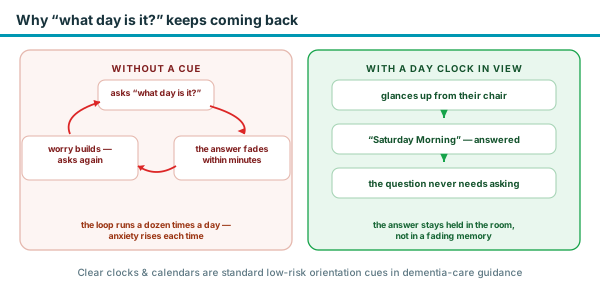
The repeated "what day is it?" is not casual forgetfulness. Orientation to time is one of the earliest abilities dementia erodes — it is why standard cognitive screens such as the MMSE and MoCA open by asking the day, date, and season. The person asks, hears the answer, and the answer fades within minutes; the need to know remains, so the question returns, often with a little more anxiety attached each time.
A day clock changes the mechanics of that loop. Instead of the person having to hold the answer, the answer stays held in the room: a glance replaces a question. Clear clocks and calendars sit on the standard list of environmental orientation cues that dementia-care organizations recommend for the home — low-cost, low-risk, and easy to add. To be straight about the evidence: that recommendation comes from care practice, not from large clinical trials of calendar clocks specifically, and no clock slows the condition itself.
The realistic goal is narrower and still worth a lot — removing a dozen small moments of confusion a day, and the friction they cause on both sides. Families look for fewer repeated questions and calmer starts to the day, and the clock works best as one anchor inside a predictable dementia daily routine.
The display: plain words, no abbreviations
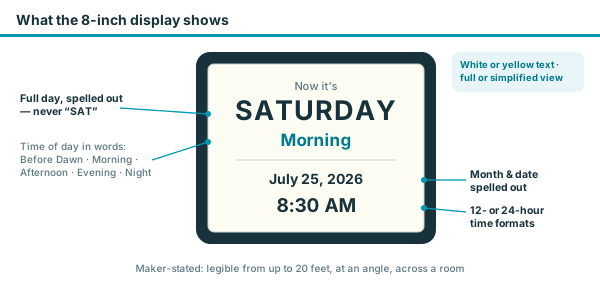
The core of a good dementia clock is that it removes ambiguity, and this is where the American Lifetime leads. Instead of a code like "MON 03/14", it spells everything out — the full day of the week, the month and date, and the time of day in words, such as "Now it's Saturday Morning". There are no abbreviations to decode.
The 8-inch screen is an HD 800 x 600 panel (the maker says the screens are imported from Japan for clarity), high-contrast and, per American Lifetime, legible from up to 20 feet — which also makes it useful among low-vision aids. You can show the full calendar or a simpler day-and-time-of-day mode, and choose a white or yellow display.
It also labels the part of the day — Before Dawn, Morning, Afternoon, Evening, and Night. For someone who wakes disoriented, seeing "Night" spelled out can be more grounding than a time alone, and that orientation is one of the small things that eases sundowning. You can hide the period if you prefer.
How to set the day, date, and time (step-by-step)
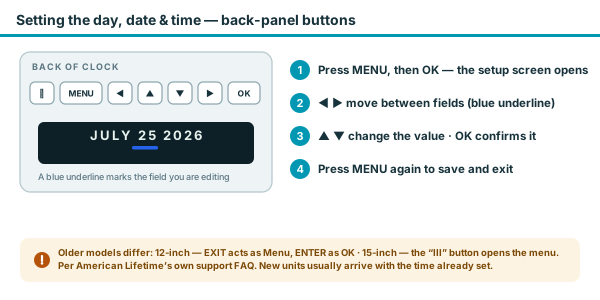
Units typically arrive with the time already set, so many families only need to nudge the hour for their time zone. Everything is adjusted from the buttons on the back panel — Power, Menu, OK, and four arrows — and the whole job takes under a minute:
- Press Menu, then OK — the setup screen opens.
- Move between fields with ◀ / ▶ — a bold blue underline marks the field you are editing (day, date, month, year, hour, minute).
- Change the value with ▲ / ▼, and confirm with OK.
- Press Menu again to save and return to the clock face.
Older models use different labels for the same steps: on the earlier 12-inch, EXIT acts as Menu and ENTER as OK; on the earlier 15-inch, the button marked "III" opens the menu. American Lifetime lists these variants in its own support FAQ.
While you're in the menu you can also switch between the full-calendar and simplified displays, choose white or yellow text, pick one of the 8 languages, and set 12- or 24-hour time.
The five medication alarms: setting, changing, and silencing them
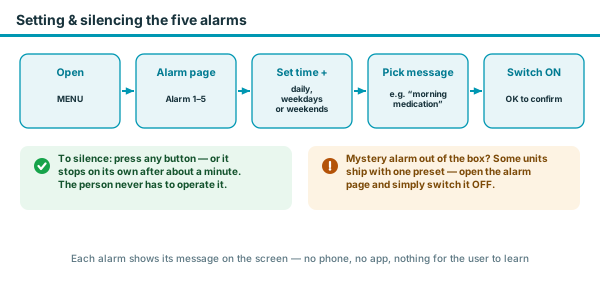
It offers up to five customizable daily alarms — American Lifetime calls it a multi-function alarm system for wake-ups, medication reminders, and appointments — each with its own on-screen message. Setting one up:
- Open Menu and move past the time settings to the alarm page — you will find Alarm 1 through Alarm 5.
- Set each alarm's time the same way you set the clock, choose whether it repeats every day, on weekdays, or on weekends, and pick a preset message such as the morning-medication prompt — or none.
- Switch the alarm ON, confirm with OK, and exit with Menu.
When it rings, it sounds for about a minute and stops on its own, or any button silences it — the person using the clock never has to operate anything.
One quirk worth knowing before it startles anyone: some units arrive with an alarm already switched on at the factory, and buyers on the product's Q&A describe the printed quick-start skipping the alarm instructions entirely. If a mystery alarm goes off, open the same alarm page and switch it OFF — nothing needs resetting.
The alarms are a genuine help for medication management, though for dispensing the right dose at the right time an automatic pill dispenser does more than a reminder alone.
Power, backup, and the daylight-saving caveat
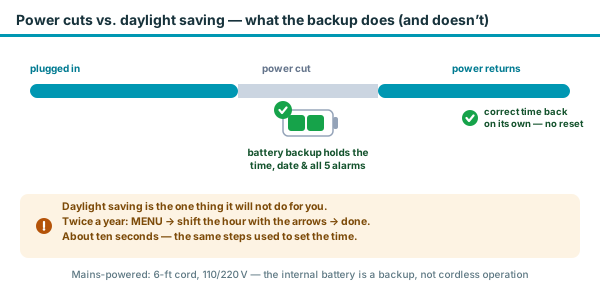
The clock runs on mains power through a 6-foot cord and works on 110v or 220v; it isn't a battery-only device, so it needs to sit near an outlet. It does include a battery backup, which keeps the time, date, and alarms through a power outage and resets automatically when power returns — so a brief power cut won't leave it wrong.
The one point worth being clear about: American Lifetime's own FAQ states the clock must be adjusted manually for daylight saving. The battery backup preserves the time you've set through outages, but it does not shift the clock forward or back in spring and autumn — you do that yourself with the same Menu-and-arrows steps used to set the time, which takes about ten seconds. It is the single thing to know before buying, and the reason we corrected the common "automatic DST" claim.
Where to place it so it actually orients
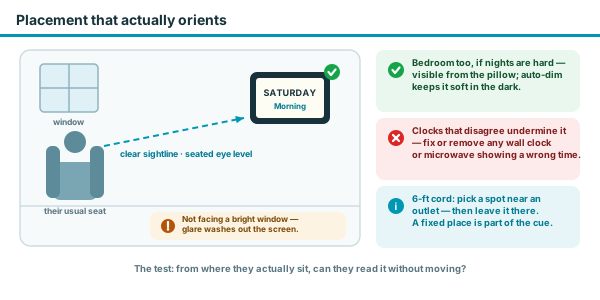
A day clock only works if it sits inside the person's natural line of sight — the aim is that the answer is seen before the question forms. The test is simple: from where they actually sit, can they read it without moving?
- Living room first — directly facing their usual seat, unobstructed, at roughly seated eye level rather than high on a wall or off in a hallway.
- Bedroom second, if nights are the hard part — visible from the pillow, where the auto-dimmed display and the "Before Dawn / Night" label answer the frightening is-it-morning moment without turning on a light.
- Avoid facing a bright window — glare can wash out the screen at exactly the times of day it matters; angle it or shift it a few feet.
- Pick the spot once and keep it — the 6-foot cord means planning around an outlet anyway, and a fixed, familiar location is itself part of the cue.
- Silence the disagreeing clocks — a wall clock that was never reset or a microwave blinking the wrong time actively undermines the day clock. Fix or remove anything that contradicts it.
In a larger home, a second unit covering the bedroom is the usual answer to two-room disorientation — and if wandering at night is part of the picture, that is a different problem with different tools, covered in our GPS tracker guide.
Who it helps (and who it won't)
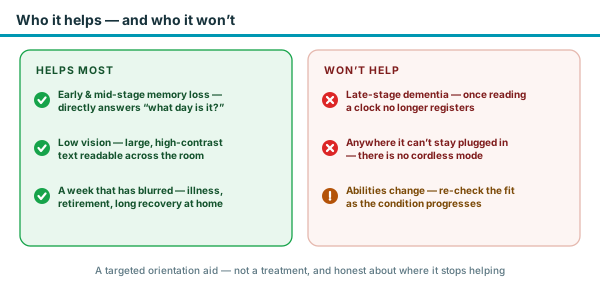
A day clock is a targeted tool, so it is worth being clear about fit:
- Dementia and memory loss — the plain-word day and date directly answer the "what day is it?" question and reduce the anxiety behind it.
- Low vision — the large, high-contrast 8-inch display is readable from across the room.
- Anyone losing track of the days — retirement, illness, or reduced routine can blur the week even without dementia.
- Not for very late-stage dementia — once a person no longer reads or interprets a clock, it stops helping; other dementia-care-at-home supports matter more.
Abilities change as the condition progresses, so revisit the fit from time to time — a clock that earns its place in the middle years may quietly stop registering later, and that is a signal about the person, not a fault in the product.
Troubleshooting the common problems
The problems owners actually search for, with the fixes:
- Wrong time or date — open Menu → OK and re-set the underlined field. After the twice-yearly daylight-saving change this is a deliberate ten-second job, not a fault.
- Alarm not sounding — on the alarm page, check that the alarm is switched ON and that its time and repeat days (daily, weekdays, weekends) are what you expect.
- Alarm going off that you never set — a factory-preset or long-forgotten alarm; open the alarm page and switch it OFF.
- Too bright at night, or too dim — the auto-dimmer softens the screen from 7pm to 7am; check whether it's on or off in the menu and set it the way you prefer.
- Frozen or garbled display — unplug it, wait a few seconds, and plug it back in. The battery backup holds the time, date, and alarms, so nothing needs re-entering.
- Display in the wrong language — the language option sits in the same settings menu; arrow through and reselect English (or the language you want).
If none of that clears it, the clock carries a 1-year warranty — American Lifetime's support FAQ and contact page handle the rest.
A discreet, giftable design
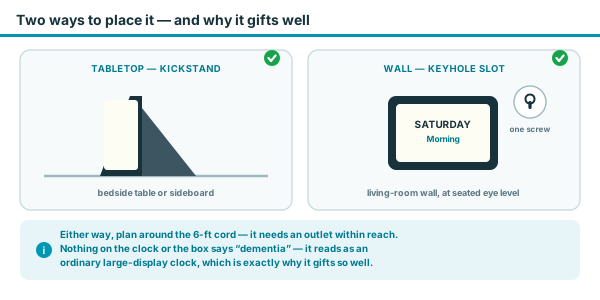
American Lifetime deliberately keeps the words "dementia", "Alzheimer's", and "memory loss" off the product and packaging, so it reads as an ordinary large-display clock. For families worried about a loved one feeling labelled, that thoughtfulness matters — and it makes it an easy, respectful gift for a senior.
It has a kickstand for a tabletop and a keyhole for wall-mounting, so it fits a bedside table or a living-room wall, and comes with a 1-year warranty. The night auto-dimmer (7pm–7am) keeps it from glowing too brightly in a bedroom, which helps if sleep is already disrupted.
What American Lifetime says
The following are American Lifetime’s own marketing claims from the product listing, not our independent findings. Figures such as ratings and review counts change over time — check the current Amazon listing for the latest.
- American Lifetime states the 8-inch HD display spells out the full day, date, month, and time of day with no abbreviations and can be read from up to 20 feet away.
- American Lifetime describes up to 5 multi-function alarms for wake-ups, medication reminders, and appointments.
- American Lifetime states the automatic dimmer softens the display from 7pm to 7am, and that the battery backup retains the time and settings through a power outage.
- American Lifetime notes the clock supports 8 languages and both 12- and 24-hour formats, and that it must be adjusted manually for daylight saving.
How it compares to other dementia clocks
The American Lifetime is our best overall pick for a clear day clock that rides out power cuts on its own. Quick guidance if your need is more specific: more alarms or stronger auto-dimming point to another calendar clock in the roundup; significant vision loss points to a talking clock that speaks the time aloud; and if even alarms feel like clutter, a stripped-back day-and-date model keeps only the essentials. All of them, and the related tools for other parts of dementia care, are compared in our roundup.
- The other dementia clocks — the JALL calendar clock, a simpler non-abbreviated clock, and a talking clock for low vision — all compared in the roundup.
- Automatic pill dispensers — for dispensing medication on a schedule rather than only reminding — a complement to the clock, not a substitute.
- GPS trackers for dementia — if wandering is also a concern, a different tool entirely.
Frequently asked questions
Press the Menu button on the back, then OK to open the setup screen. The ◀/▶ arrows move a bold blue underline between fields, ▲/▼ change the value, OK confirms, and Menu exits. Older models differ slightly: the 12-inch uses EXIT as Menu and ENTER as OK, and the 15-inch opens the menu with the "III" button.
Usually one of two things: the twice-yearly daylight-saving change, which this clock does not make automatically, or a slipped setting. Either way the fix is the same ten-second Menu-and-arrows adjustment. After a power cut, the battery backup restores the correct time on its own — no reset needed.
Some units ship with a factory-preset alarm switched on. Open Menu, move to the alarm page (Alarm 1–5), find the one showing ON, and switch it OFF. A ringing alarm also stops after about a minute, or when any button is pressed.
No. American Lifetime's FAQ states it must be adjusted manually for daylight saving — about a ten-second change twice a year. Its battery backup keeps the time you've set through power outages, but it does not shift the clock for DST.
It is an 8-inch HD screen (800 x 600 resolution) that spells out the full day, date, and time of day in large, non-abbreviated text, readable across a room.
Up to five customizable daily alarms, with preset medication-reminder messages or a plain alarm. Each can be set for every day, weekdays, or weekends.
Yes. It runs on mains power through a 6-foot cord (110v or 220v). The internal battery is a backup that keeps time through outages, not a way to run the clock cordless.
No — American Lifetime intentionally leaves the words dementia, Alzheimer's, and memory loss off the product and packaging, so it looks like an ordinary large-display clock and gifts discreetly.
Eight: English, Spanish, French, German, Italian, Dutch, Polish, and Welsh, with 12- or 24-hour time formats.
American Lifetime Day Clock
Best for: Most seniors who need a clear, large-print day-and-date clock they can read across a room
We may earn a commission, at no cost to you.
